Configuration and information
Configuration
Section titled “Configuration”The Configuration dialog box looks like this:
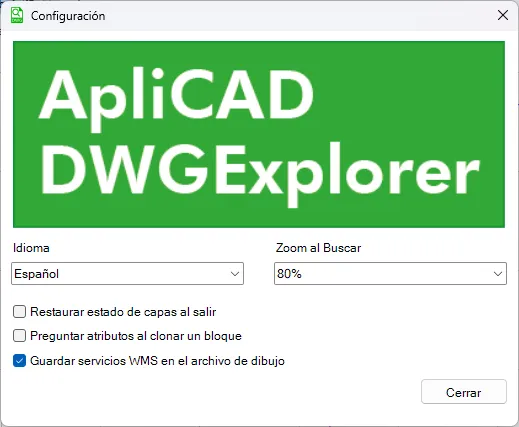
In this dialog box you can set various parameters that control how the application works, including the following:
- Language – Selects the interface language. The application is currently available in Spanish and English.
- Zoom When Searching – Sets the zoom level applied when locating an element. This way, besides the object found, an area around it is also shown, making it easier to identify in the drawing. For example, you can set a value of 70%.
- Restore layer state on exit – One of the program’s features is that, when analyzing the drawing, it includes all objects in the list, even those on layers that are turned off. If you zoom to one or more entities on layers that are off, the program temporarily turns those layers on so the objects can be displayed correctly. This option lets you choose whether, when you close the list of elements, the layers that were turned on automatically should return to the state they had before the selection.
- Ask attributes when cloning a block – If this option is enabled and you clone a block that contains attributes, the program asks you for the value to assign to each attribute when inserting the new block. This lets you customize the data of the cloned block as you create it.
- Save WMS services in the drawing file – If this option is enabled, whenever you use WMS services, the program stores the information about the available WMS layers and their display order inside the drawing when you save the file. That way, you do not need to select the WMS services again when you open the drawing.
Information
Section titled “Information”The About… button gives access to relevant information about the program status and its license.
In this window you can check the current version of the application, the license expiration date and other useful information about managing and using the software.
The system also tells you if an update is available and waiting to be installed, making it easy to keep the program on its latest version.