Cadastre GML files
Spanish Cadastre GML exchange files are used to transmit georeferenced map information for parcels and buildings between different agencies, professionals and IT systems. The format is based on GML (Geography Markup Language), an XML-based geographic data standard that describes spatial objects through coordinates and associated attributes.
In the context of the Cadastre Virtual Office, these files are mainly used to exchange graphic information on cadastral parcels between the Cadastre, the Land Registry, notaries, technical professionals and citizens. Their goal is to ensure that properties are represented in a way that is accurate, georeferenced and compatible across the different systems that manage land information.
GML files contain information such as:
- The geographic coordinates of the vertices that define the perimeter of a parcel or building.
- The complete geometry of the plot (shape and boundaries of the property).
- The area, calculated from the coordinates.
- Identification data and cadastral attributes associated with the parcel or construction.
Thanks to this structure, GML files make it possible to:
- Register or modify parcels in the Cadastre (subdivisions, mergers, reparcelling, etc.).
- Coordinate information between the Cadastre and the Land Registry, providing a georeferenced graphic representation of properties.
- Technically validate the geometry of a parcel using the graphic validation services of the Cadastre e-Office.
- Exchange map data between different GIS or CAD programs while keeping coordinate accuracy.
In short, GML files are the official format for exchanging cadastral graphic information in Spain, describing the position, shape and area of parcels accurately and enabling interoperability between public administrations, technical professionals and software applications.
New GML parcel
Section titled “New GML parcel”When you have a correctly georeferenced parcel in the drawing, you can generate a GML file to import that parcel as a graphic alteration in the Cadastre e-Office.
To do this, the program first asks you to select a point inside the parcel, which must be defined by a closed polyline.
Once the program confirms that the selected point lies inside a closed polyline, it displays the following dialog box:
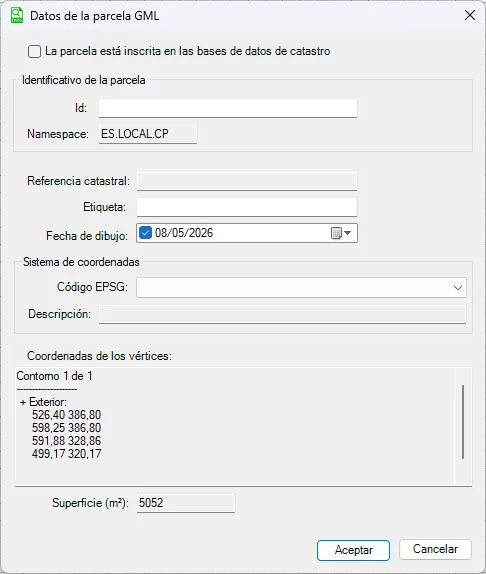
Fill in the parcel information and click Aceptar (OK).
Edit parcel
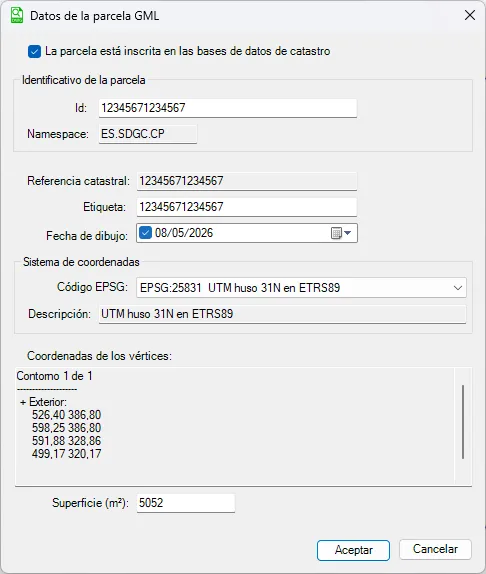
Section titled “Edit parcel”When you create a new parcel, the program places the value entered in the Etiqueta (Label) field at its centroid.
This way, if you select the parcel you have just created, the program shows all the information associated with it so you can review and edit it. For example:
Export parcel
Section titled “Export parcel”Use this function to generate a standards-compliant GML file with the parcel information.
After you select the parcel to export, the program asks for the folder where the GML file will be saved.
By default, the program suggests the cadastral reference as the file name.
Import GML
Section titled “Import GML”Just as you can generate a GML file, you can also import one into the current project.
Simply choose the file to import, and the program creates the parcel automatically from its contents.
When the import finishes, the program performs a zoom extents and shows the imported parcel.
Building GML functions
Section titled “Building GML functions”For constructions (buildings), the process is similar to that for parcels, bearing in mind the following:
The building GML represents the footprint or geometry of the existing constructions within a parcel. In other words, it does not define the parcel boundaries, but the position and geometry of built elements, such as:
| Element | What it represents |
|---|---|
| Buildings | Footprint of the construction |
| Other constructions | For example, swimming pools or other built elements |
| Footprint coordinates | Vertices that define the built outline |
| Relationship with the parcel | Lets you check whether the construction lies within a parcel |
The Cadastre distinguishes between the two formats: parcels are modeled with the INSPIRE cadastral parcel format, while the buildings on the parcel are modeled with the INSPIRE building GML format.
Accordingly, there are functions to create, edit, import and export buildings (New Building, Edit Building, Import Building and Export Building).